finally we had some nice stone sculpting at the SAE in Cologne.
a little mudbox session, where we sculpted and also painted and baked the stone.
baking was in 3dsmax
Showing posts with label stone. Show all posts
5.4.13
13.9.10
tileable stone tests..
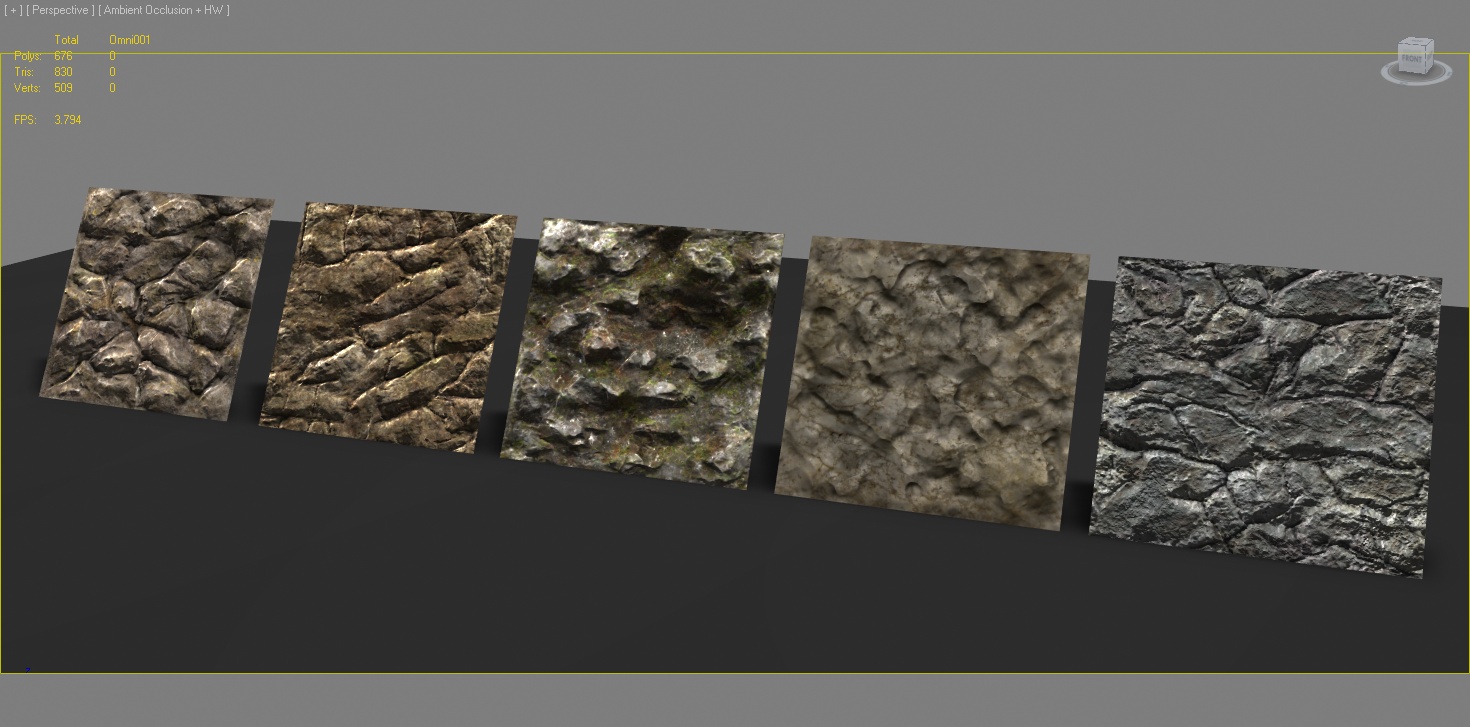
jo hi, i just tried out a modeling technique for tileable stone textures. i used supporting edges around the corners, and then gave everything the same smoothing group.the meshes are not optimized then, so quite many polys here. the result is not that cool how i hoped for.
there are 5 different materials all on the same mesh. 1 diffuse, 1 normal, one specular.
always 2 lights with realtimeshader in 3dsmax viewport. no shadows, only ambient occlusion was on.
most of the time you will need to create tileable stonemaps in games, at least, when you're into open world games.
because the unique mapped meshes have a limitation of size, since the pixels get very large, when the prop is scaled. therefore you need tiles, to keep a reasonable texelsize.
so the cons about tileables are: seams, not very defined and blotchy geometry, therfore not readable.
so here i tried a technique, which should give the model a more defined and readable look by using supporting edges around meshcorners and then apply only 1 smoothing group to all
conclusion: when the mesh is optimized, this modeling techique can work,you will get slighty rounded corners.which can be made more solid, the more near you place the supporting edges to your corner edge.
absolutely inevitable is ambient occlusion shadow, which will give your model the depth it needs to read it well. all bigger engines will give you realtime AO shadows ingame.
if not available, a workaround could be dirtmaps in mapchannel 2 to fake AO. but thats much work.
btw. if you want to test my maps, or use them, then down them here: http://dl.dropbox.com/u/6300026/Stone_Tests.rar
have phun, i share them for free. give credit to me, if you use them, although the specs are very crappy.
there are 5 different materials all on the same mesh. 1 diffuse, 1 normal, one specular.
always 2 lights with realtimeshader in 3dsmax viewport. no shadows, only ambient occlusion was on.
most of the time you will need to create tileable stonemaps in games, at least, when you're into open world games.
because the unique mapped meshes have a limitation of size, since the pixels get very large, when the prop is scaled. therefore you need tiles, to keep a reasonable texelsize.
so the cons about tileables are: seams, not very defined and blotchy geometry, therfore not readable.
so here i tried a technique, which should give the model a more defined and readable look by using supporting edges around meshcorners and then apply only 1 smoothing group to all
conclusion: when the mesh is optimized, this modeling techique can work,you will get slighty rounded corners.which can be made more solid, the more near you place the supporting edges to your corner edge.
absolutely inevitable is ambient occlusion shadow, which will give your model the depth it needs to read it well. all bigger engines will give you realtime AO shadows ingame.
if not available, a workaround could be dirtmaps in mapchannel 2 to fake AO. but thats much work.
btw. if you want to test my maps, or use them, then down them here: http://dl.dropbox.com/u/6300026/Stone_Tests.rar
have phun, i share them for free. give credit to me, if you use them, although the specs are very crappy.
1.9.10
Stone altar - 3d concept sketch
this one is a stone altar thingy in mudbox done for training purpose.
only highpoly with texture nothing baked.. ~2h
you wont see this one in any game.
only highpoly with texture nothing baked.. ~2h
you wont see this one in any game.
22.6.10
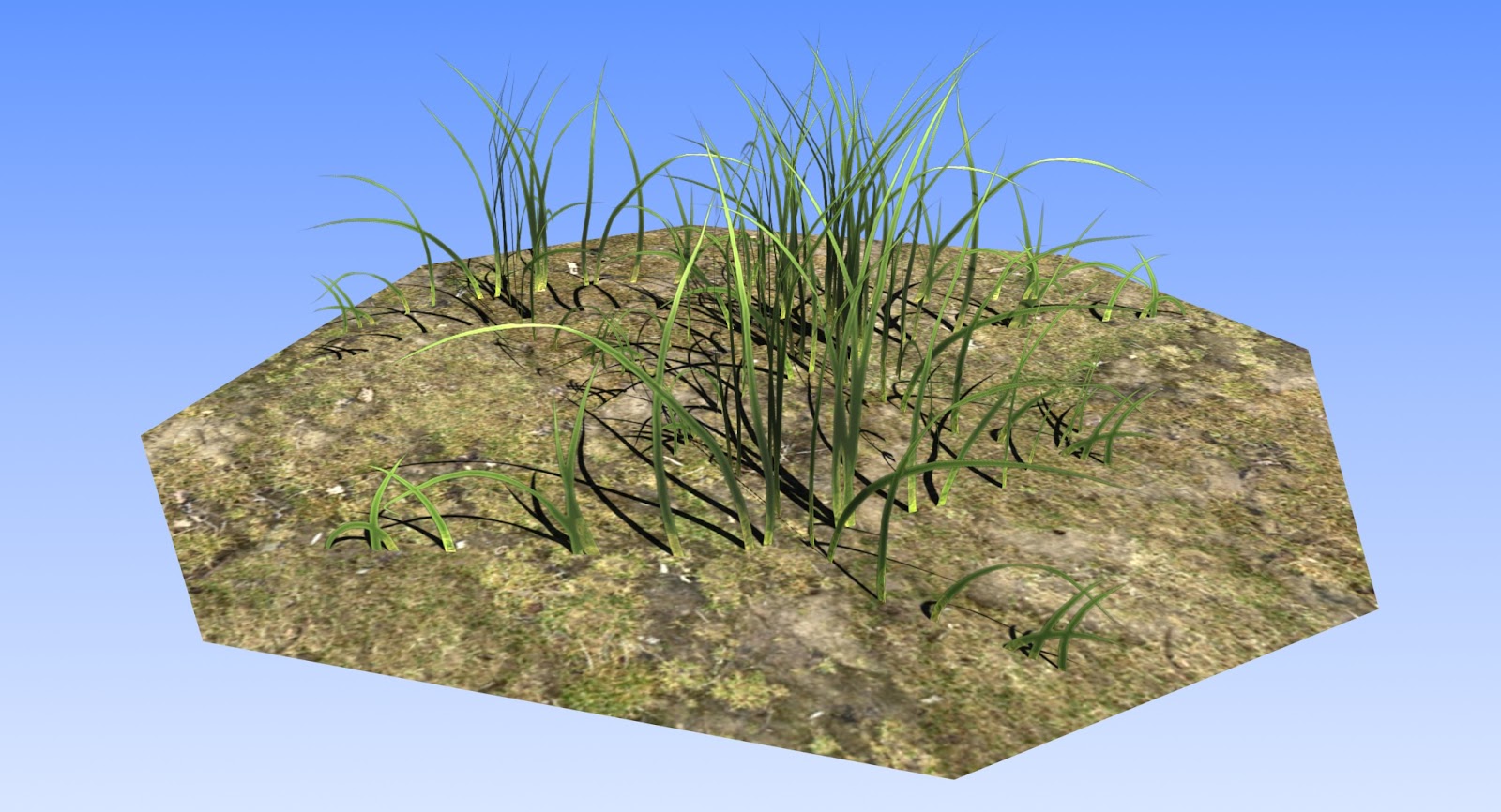
art_II_09, an epic sandstone and some grass
jo this course also got a lecture in stonedisplacements, but also in alpha grass.
see the results here.
The stones got some nice sandstone color
and 3d grass always needs some dark AO painted in the middle of the texture, so that it wont look flat, when placed in groups!
see the results here.
The stones got some nice sandstone color
and 3d grass always needs some dark AO painted in the middle of the texture, so that it wont look flat, when placed in groups!
13.4.10
3dsmax Environment Modeling #2 Procedural Stone. Mapping and painting
sorry for this video being very fast, i wanted to keep it short.
there's a short audio bug at 7.35 min. two tracks overlay there. but i think its no problem, since no relevant info is told there.
3dsmax Environment Modeling #2 Procedural Stone. Mapping and painting from sascha henrichs on Vimeo.
This video covers mapping techniques for highpoly objects, and painting of objects in mudbox 2010.
its very technical and much longer than the first, so beware.
~17 min
~300 MB of HQ video
Its the 2nd part of a stone modeling tutorial
find the first one here
http://vimeo.com/10163233
there's a short audio bug at 7.35 min. two tracks overlay there. but i think its no problem, since no relevant info is told there.
3dsmax Environment Modeling #2 Procedural Stone. Mapping and painting from sascha henrichs on Vimeo.
This video covers mapping techniques for highpoly objects, and painting of objects in mudbox 2010.
its very technical and much longer than the first, so beware.
~17 min
~300 MB of HQ video
Its the 2nd part of a stone modeling tutorial
find the first one here
http://vimeo.com/10163233
15.3.10
3dsmax Environment Modeling #1 Procedural Stone
Hi folks,
here is part one of another tutorial about stony stuff.
In this tutorial you will learn how to set up a modeling rig on a sphere object, in order to make it look like a stone.
This technique delivers a very believable result and is absolutely non destructive. Once set up, you can easily modify the results, only by changing the mappingoffsets in the first "cellular" displacement map.
This video is only about the modeling rig, a later tutorial will cover the mapping an texturing for the highpoly, as also an approach to make this a game ready asset.
~ 8 min
~ 110 MB HD
This video is only about the modeling rig, a later tutorial will cover the mapping an texturing for the highpoly, as also an approach to make this a game ready asset.
~ 8 min
~ 110 MB HD
31.1.10
29.1.10
3dsmax Props for games #1 Procedural Stones - Sneak Peak
hi, one more time you will learn, how to make cool stones.
currently i'm recording a "how-to" video concerning procedural displacment maps for stone props in 3dsmax.
so no more sculpting stones, now its displacment time.
but here you see only a sneak peak of the tutorial, just to justify another blog update ;)
currently i'm recording a "how-to" video concerning procedural displacment maps for stone props in 3dsmax.
so no more sculpting stones, now its displacment time.
but here you see only a sneak peak of the tutorial, just to justify another blog update ;)
27.7.09
third day of Art_I_08_FFM lecture

jo a bit late but finally a viewport shot of the stone, that was modeled in 3dsmax, then sculpted in mudbox, then mapped in max, then speed painted in mudbox :)
the trick is to go for hard edges otherwise this whole thinge would look too blobby.
currently i have a stone making video tutorial in the making, but its not ready yet.
perhaps the next week you can download it!
the initial diffuse and normal size was 2048, but it also works both reduced to 512!

3.11.08
New Games Academy Stuff to come
i just finished a new basic modeling class with course GD_II_08. and we modeled 2 blade war axe.
the presentation render will follow in a few days.
also i wanted to record some video tutorials on low polymodeling, mapping and texture creation for games. but this will take some days.
So the axe texture is still not ready, but meanwhile i'll post a stone, that was done lecturing an art class at GA Berlin.
This stone has 136 tris, and was done using 3dsmax,Mudbox,Bodypaint and Photoshop.
The beautyrender was only done with normal lights and photoshopping. :)
Here the wireframe. This stone only has a Diffuse, that is also functioning as specular color and intensity, and a normalmap.
So it will work very well in a realtime environment.
I also want to do a video tutorial about modeling stones.
Look at that 360° viewer. Be aware its ~9 MB
(click and drag the image)
the presentation render will follow in a few days.
also i wanted to record some video tutorials on low polymodeling, mapping and texture creation for games. but this will take some days.
So the axe texture is still not ready, but meanwhile i'll post a stone, that was done lecturing an art class at GA Berlin.This stone has 136 tris, and was done using 3dsmax,Mudbox,Bodypaint and Photoshop.
The beautyrender was only done with normal lights and photoshopping. :)
Here the wireframe. This stone only has a Diffuse, that is also functioning as specular color and intensity, and a normalmap.So it will work very well in a realtime environment.
I also want to do a video tutorial about modeling stones.
Look at that 360° viewer. Be aware its ~9 MB(click and drag the image)
Subscribe to:
Posts (Atom)